Showing posts with label source. Show all posts

Sunday, 17 June 2012

Joystick test application (Qt + SFML) [Windows/Linux]

Previously, a demonstration for joystick control was published. It was a demo that made use of Windows DirectInput COM-library with Qt to retrieve the data from joystick - buttons' state and axes positions. Since DirectInput is not a cross-platform library, a new cross-platform demo, based on SFML library is prepared (library has a very liberate license).

How demo works.
The main class of this demo is XInput (include header xinputGamepad.h). It is instantiated and then initialization method initInput(joystick_id) is called, where joystick_id is the index of a joystick in the system starting from zero. Then a timer is set up to generate timeout event every 15 milliseconds (smaller values increases refresh rate and responsiveness), where update() method is called, and joystick state is retrieved using getHorizontal(), getVertical(), isKeyPressed(key_id)getRawAxis(axis_id) and other class functions. 


  Download link:
       application demo (zip): Public_QtJoystick-SFML-Win32-386 - version 0.3a [Win32/i386] - 5.91 MiB
       source code (zip): Source_QtJoystick-SFML - version 0.3a - 233 KiB

    It is written with Qt 4.8.1 for Desktop. Source code is available for download and use under the LGPLv2 or MIT license.

  Usage:
1) Download Public_QtJoystick-SFML.zip archive
2) Unpack it with zip extractor
3) Plug in the joystick (if it isn't plugged in yet)
4) Run QtJoystick-SFML

If you don't have a joystick yet, but want to test the application, there is a joystick emulator for Windows PPJoy (download link, git repository). If you know keyboard/mouse-to-joystick emulator for Linux, please post it in the comments.


Sunday, 4 September 2011

DXF writer library [C++]

This is a header-only C++ library for generating Autodesk DXF files. I have used it in a laser cutting application to generate an arbitrary contour. The original idea is taken from here. Here is a similar library (QCad dxflib).
This library already includes routines to write: circles, lines and polylines.
It is easily expandable. Use reference manual "Autocad 2012: DXF Reference" (PDF) to add needed DXF entities.
The library is LGPL or MIT. If you have modifications or additions, please let me know or contribute directly to Git.

  Git repository:
       https://github.com/okosan/XDxfGen

  Download link:
       git clone https://github.com/okosan/XDxfGen
       previous library and sample source code (zip): Source_XDxfGen - version 0.3 - 14.0 KiB

Support: comment here for any questions. Or use git contacts. Or write to e-mail:

Friday, 15 July 2011

Fuzzy logic control sample application

The following application simulates control of an object using configurable fuzzy logic controller. Its database of rules and object transfer function is currently hardcoded. However there's an option to configure everything else of the fuzzy logic controller (FLC - refer to wikipedia).
Here's the main window at start up:
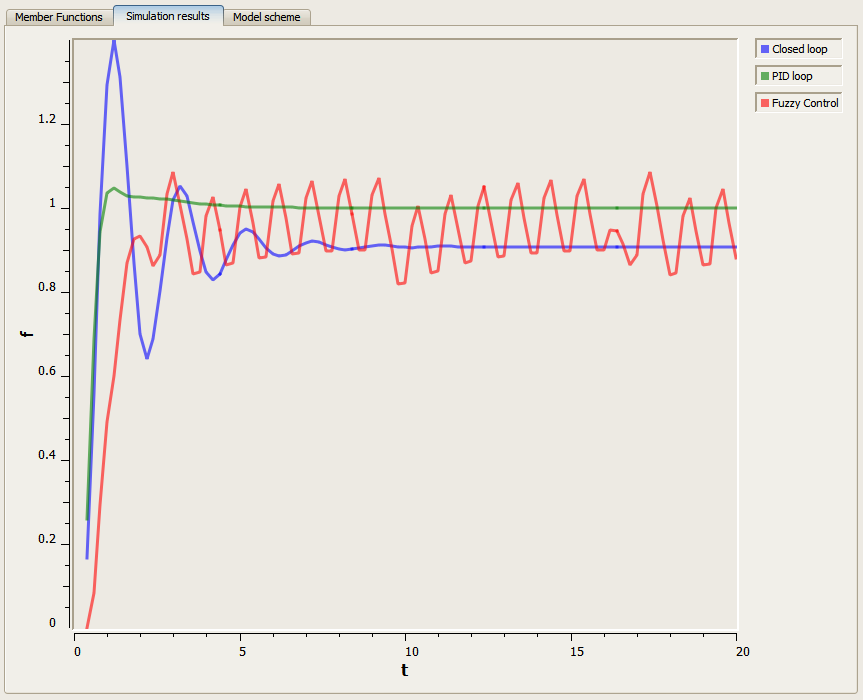
After simulation run, the transition process may be seen on a Simulation results page:
The output plot draws modelling results for closed loop run (without control), PID control (with customized parameters) and FLC configuration.
This FLC implements simplest behavior. However, the source code is open for modifications (download links below).
    Some functionality is still missing (chirp signal input, simulated error plot and plot for derivative of error, etc.).

Source code is written in C++ (mingw) + Qt SDK 1.1. Plots are drawn with Qwt project QwtPlot widget. Application is open source MIT or LGPLv3.

  Download link:
       application archive (zip): Public_XCtrlFuzzy - version 1.0 [Win32/i386] - 4.34 MiB
       source code (zip): Source_XCtrlFuzzy - version 1.0 - 7.79 MiB

Wednesday, 6 July 2011

Joystick test application (Qt + DirectInput8) [Windows]

  This application is provided to test joystick output using DirectInput8. It reports the axis positions, as well as the buttons' state.

  Download link:
       application archive (zip): Public_QtJoystick - version 0.2b [Win32/i386] - 4.53 MiB
       source code (zip): Source_QtJoystick - version 0.2b - 292 KiB

    It will be later used in my OGL6 tank game and robot simulation (which is based on the game's engine). Any suggestions, questions and comments are welcome. It is distributed under the LGPL or MIT license on your choice.

    It is written with Qt SDK 1.1 & QtCreator 2.1. Source code is available for download and use under the LGPLv2 or MIT license.

  Usage:
1) Download Public_QtJoystick .zip archive
2) Unpack it with windows zip unpacker or any archive tool (like 7-zip) to any directory
3) Plug in the joystick (if it isn't plugged yet)
4) Run QtJoystick.exe

Sunday, 17 April 2011

StarCraft Network Launcher for Hamachi

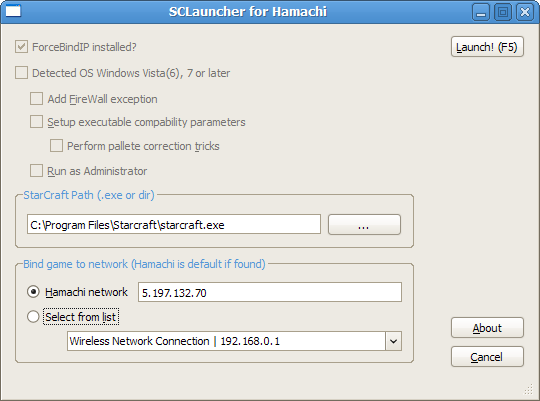
  StarCraft is known to have issues when playing on LAN or VPN (like Hamachi VPN) on a computer with multiple networks enabled at the same time. Also StarCraft looses palette at start up on newest Windows Vista and Seven due to display subsystem changes (and DirectDraw changes). To fix network ambiguity problems it is recommended to run StarCraft with ForceBindIP command line tool. To fix palette problems on newer Windows there are some tricks discovered by users.
  To ease and combine all these in one solution I have written a simple StarCraft launcher (which can be used with other similar applications as well).

  Download link:
       application archive (zip): Public_scxLauncher - version 0.8b [Win32/i386] - 4.66 MiB
       source code (zip): Source_scxLauncher - version 0.8b - 146 KiB

  Previous versions:
       application archive (zip): Public_scxLauncher - version 0.7b [Win32/i386] - 5.67 MiB
       source code (zip): Source_scxLauncher - version 0.7b - 21.2 KiB

  It is still beta and I will be very thankful for suggestions and comments (the mail is below). It is distributed under the GPL, LGPL or MIT license on your choice.

  This launcher is dependent on ForceBindIP (website is http://www.r1ch.net/stuff/forcebindip/) and includes its package inside (my launcher will install ForceBindIP itself, just run it with administrator rights).

  The Launcher is written with Qt SDK 1.1RC & QtCreator 2.1. Source code is available for download and use under LGPLv2 and MIT license.

  In future versions I will add a DirectDraw registry fix to improve SC's palette stability.

  Usage:
1) Download launcher Public_scxLauncher .zip archive
2) Unpack it with windows zip unpacker or any archive tool (like 7-zip) to any directory (non-desktop directory, please. Make sure the directory is write-enabled).
3) Run scxLaunch.exe
4) If your StarCraft is not installed properly, you should browse (Enter key or "..." button) to search for starcraft.exe

5) If you have Hamachi network, it will be detected automatically. Otherwise, select any desired network from network combo-box. (Select from list)
6) If you have Windows Vista or Seven - select needed flags (like Add firewall exception, application compatibility, palette tricks, and run as administrator flags - they are selected by default).
7) Press F5 or Launch! button to start game.
8) All launcher settings (after Launch or Cancel) are stored in config.txt, which is parsed at start up.

9) In case of any questions, please, comment below.

Update from 6th July 2011: new version 0.8b is available. Links updated (above).
Update from 2nd May 2011: primary download link is temporarily unavailable (up to 7th May).
Locations of visitors to this page